Reptile stores

Every animal, every enclosure, kept safe.

AquaMind runs a reptile shop’s register and stock, and watches the animals too: which one lives in which enclosure, its feedings, weights and sheds, live temperature and humidity — and it cuts a heater’s power before a stuck thermostat can cook an enclosure.
  • Heater cut off when it runs too hot
  • Live temperature & humidity
  • Each animal’s full record
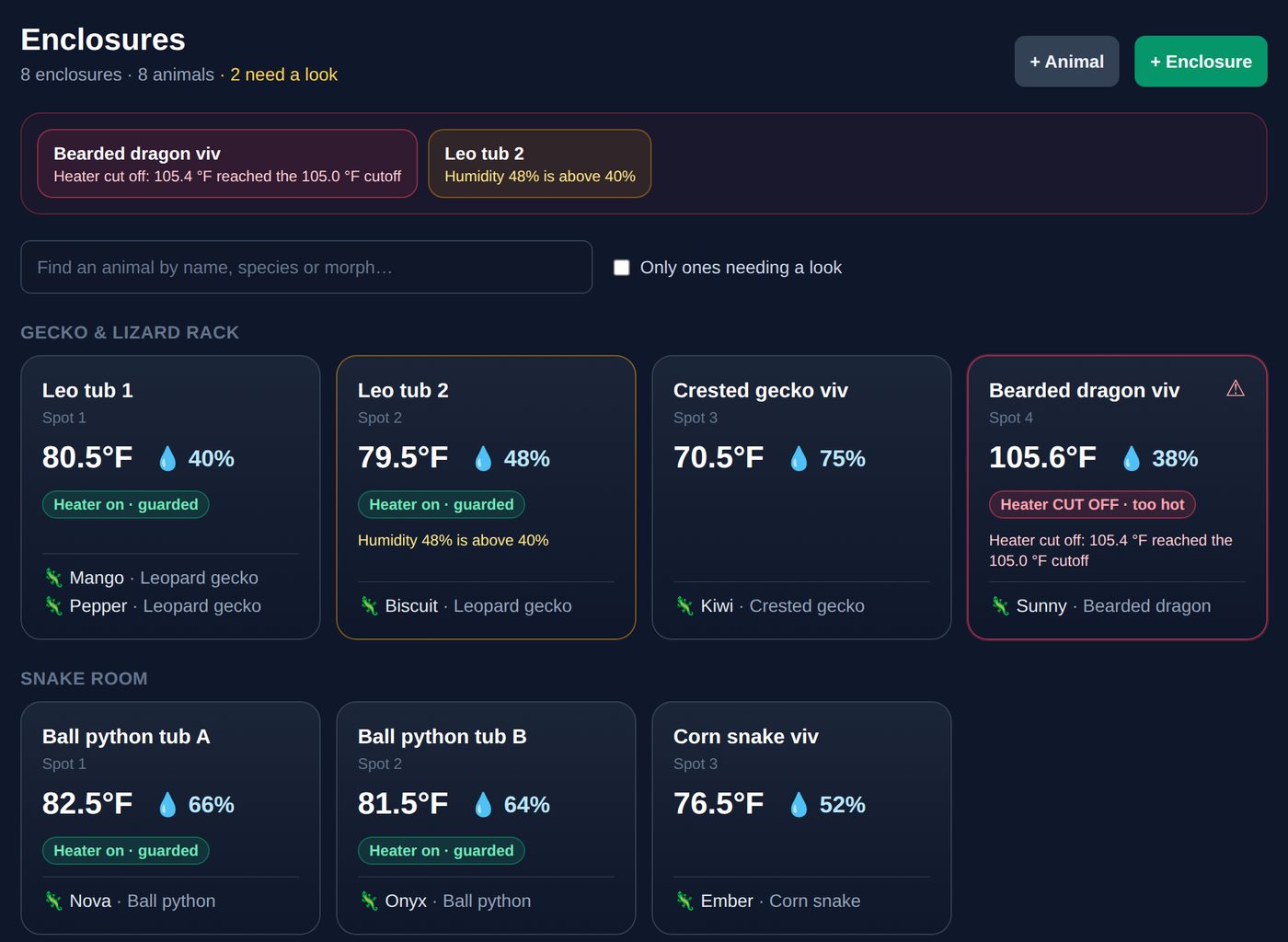
The AquaMind Enclosures board: each enclosure with its live temperature and humidity, its heater status and the animals living in it. The bearded dragon vivarium is flagged red because its heater was cut off at 105 °F.
Heater cutoff

A stuck heater gets its power cut — automatically.

Heat mats, ceramic heat emitters and basking lamps fail the same way: their own thermostat sticks on and the enclosure keeps climbing. AquaMind watches each enclosure’s temperature. The moment it reaches the cutoff you set, the heater’s power is cut and the phones signed up for AquaMind alerts get a notification.
  • Cut at your number. Set a cutoff per enclosure — 95 °F for a leopard gecko tub, 105 °F for a bearded dragon’s basking side.
  • Power back on its own. Once the enclosure cools a few degrees below the cutoff, the heater comes back on, so the animal isn’t left cold.
  • No reading, no heat. If a probe goes quiet, AquaMind cuts the heater rather than let it run blind (you can switch this off per enclosure).
  • Works without the internet. On an AquaMind Pi controller the cutoff runs on the controller itself, so it keeps working even if the store server or the network is down.
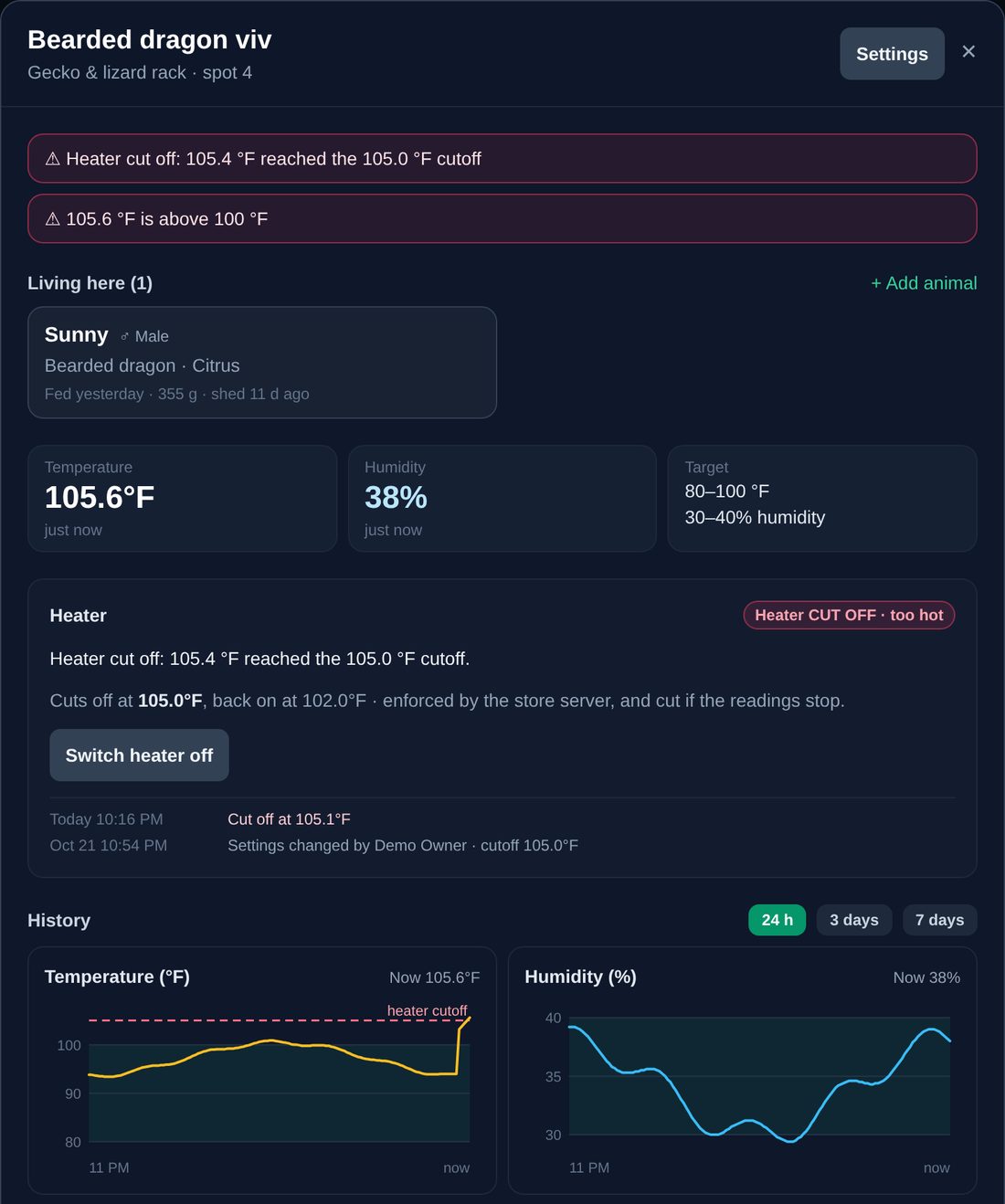
An enclosure in AquaMind with its heater cut off: 105.4 °F reached the 105 °F cutoff. Below it, 24-hour temperature and humidity charts with the cutoff line and the target ranges shaded.
  1. 1 · Watch

    A probe in each enclosure reports its temperature around the clock, and AquaMind checks it against the cutoff every few seconds.

  2. 2 · Cut

    Too hot: the relay or smart plug the heater is plugged into switches off, the enclosure turns red on the board, and a notification goes to the phones signed up for alerts.

  3. 3 · Restore

    When it cools to the “back on” point, power returns. Every cutoff and restore is kept in the enclosure’s history.

Two ways to wire it: plug the heater into a relay on an AquaMind Pi controller, or into a Tuya Wi-Fi smart plug that the AquaMind store server switches off. Use the relay’s normally-open contact, so a controller that loses power leaves the heater off — never stuck on.

Temperature & humidity

See every enclosure’s climate at a glance.

Desert species and tropical ones sit on the same rack. Give each enclosure its own range and AquaMind shows which ones have drifted, before the animal shows it.

Live readings

Temperature and humidity on every enclosure card, with how long ago each reading came in, so a quiet probe stands out too.

Target ranges

Set a low and high temperature and humidity per enclosure. Anything outside its range is flagged on the board and on the dashboard.

History charts

Day, three-day and week charts for each enclosure, with the target range shaded and the heater cutoff marked.

Reads from SHT31, SHT45 or AHT20 probes on an AquaMind Pi controller Tuya Wi-Fi temperature & humidity sensors Or a hygrometer reading typed in by staff
Animals & records

Know which animal is where — and everything about it.

The Enclosures board shows every enclosure with the animals living in it. Search a name, species or morph and AquaMind points to the enclosure. Tap an animal for its whole record.
  • One-tap care log. Fed, refused, weighed, shed, cleaned, a note or a health check — logged from the till or a phone in seconds.
  • The full history. Feedings and refusals, weights with the change since last time, sheds, health notes, every move between enclosures and the sale.
  • Who it is. Species, morph, sex, hatch date and age, breeder or supplier, price.
  • Moves are tracked. Move an animal to another enclosure and the board and its history update together.
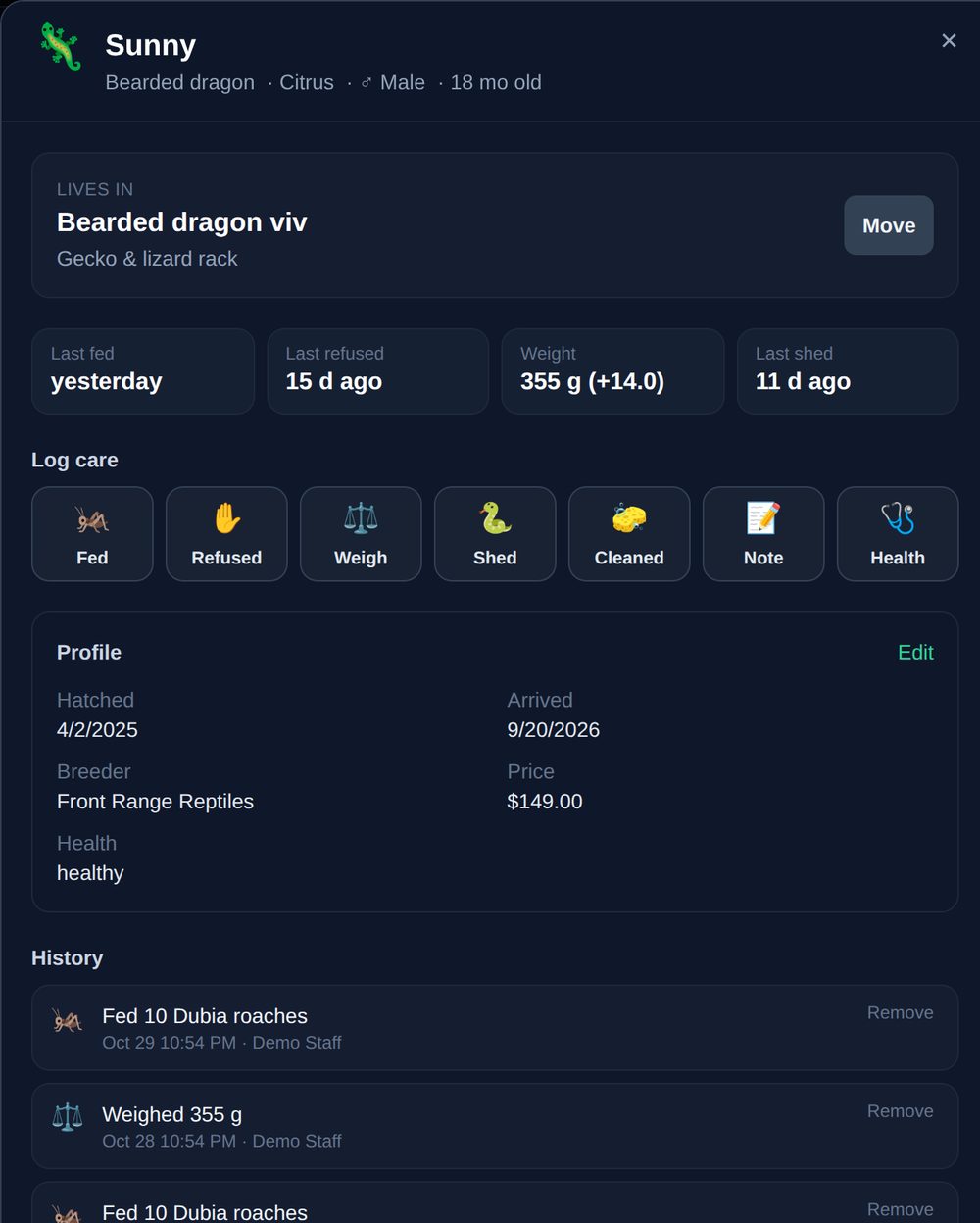
An animal record in AquaMind for Sunny, a bearded dragon: the enclosure it lives in, last fed, last refused, weight and last shed, one-tap care buttons, its profile and its care history.
The rest of the shop

The register and stock come with it.

Register & sales

Sell animals, habitat and decor, feeders and supplies from one register, with card payments and receipts.

Feeders & supplies

Track stock of crickets, roaches, rodents and supplements, and see what’s running low before you run out.

Care list

Recurring feeding days, UVB bulb checks and weigh-and-shed checks, so nothing that isn’t daily gets forgotten.

On staff phones

The same Enclosures board in the AquaMind phone app, to log a feeding while walking the racks.

Common questions

What reptile shops ask.

A temperature probe in the enclosure and a way to switch the heater’s power: either a relay on an AquaMind Pi controller, or a Tuya Wi-Fi smart plug. Set the cutoff in the enclosure’s settings. The heater’s own thermostat keeps doing its normal job — AquaMind is the safety net behind it.
Yes. On a Pi controller the cutoff runs on the controller itself, every 10 seconds, even if the store server or the network is down. With a Tuya smart plug, the AquaMind store server in your shop switches the plug over your Wi-Fi — no internet needed, but the store server and Wi-Fi have to be up.
The enclosure shows “no fresh reading” on the board, and by default the heater is cut until readings come back — a dead probe shouldn’t leave a stuck heater running unwatched. You can turn that off for an enclosure where a cold night is the bigger risk.
Enclosures and every animal’s records are part of Core. Live temperature and humidity, the charts and the heater cutoff come with the Tank Monitor & Aquatics Care module, and adding Tuya smart plugs and sensors uses Lighting & Smart Devices. See the modules or try everything with the 30-day trial.
The enclosure board and animal records do. Live sensors and the heater cutoff talk to devices on your shop’s own network, so they need the AquaMind store server in the shop. Talk to us about the best setup for your store.

See it with your own racks.

Try the complete AquaMind suite with a 30-day trial. Tell us about your store and we set it up for you, then you decide.